Your team's LinkedIn, week over week. Who's new, who moved, who went quiet.
Pipeline Studio opens your LinkedIn data export in your browser. See who is really in your network, get an account map for every company automatically (nothing to set up), map the buying committee you sell to and, with weekly uploads, see what changed and give managers a team view.
Click through eight weeks of demo data
This is the real dashboard, including the growth view and an account map. Three made-up reps, eight weekly uploads each; every person and company is fictional.
Demo data. Three made-up reps, eight weekly uploads each, including the growth dashboard, badges and account maps built automatically from the connections, with no target accounts to add. Every person and company is fictional. You're viewing it as Avery Lane (demo), who is also the manager.
Your account maps are ready: 35 companies mapped
Ranked by how many connections you have there, starting with Northwind Logistics (35). No target accounts to add.
Your level
Network Strategist
Network Strategist
1,208 points · 292 to Network Architect. You close buying-committee gaps and act on job changes.
8
week upload streak
Best
8
Uploaded this week. Your streak is safe until next week (weeks run Monday to Sunday, Eastern time).
This week at a glance
Week of Oct 26, 2026 · estimates are labelled
Total connections
801
▲ +19 this week
From your Connections file.
New this week
19
▼ −8 vs last week
Connections added since your previous upload.
Requests sent
6
▼ −4 vs last week
Outgoing invitations this week (Invitations.csv). Quality beats volume.
Acceptance rate (estimate)Estimate
44%
▲ Acceptance up 1 pt
Estimate from 198 invites sent 2 to 15 weeks ago. Accepted = the person appears in your connections.
Top-account connections added
6
▼ −5 vs last week
New connections at your top accounts.
Top-account coverage
100%
Steady vs last week
Share of your top accounts where you know at least one person (10 of 10).
VP+ added
3
±0 vs last week
New VP and C-level connections this week.
This week's focus
One or two things worth doing, picked from your own data.
Job change detected
Toby Vance just moved to Wingtip Hotels
VP Growth, was at Contoso Health. Wingtip Hotels is one of your top accounts. A short, researched note now beats a cold one later.
Paid Jade Bot kit. Price shows in your cart.Account map
Finish the Northwind Logistics map (7 of 9 seats)
Connect with Sales Leadership / CRO or Sales Enablement next. Your map shows exactly who you know and who's missing.
Badges and benchmarks
17 of 30 earned · recognition only, no perks
Network size
250 Club
Earned · week of Sep 7
500 Club
Earned · week of Sep 7
1K Club
801 of 1,000 connections
2.5K Club
801 of 2,500 connections
5K Club
801 of 5,000 connections
Weekly momentum
Fast Week
Earned · week of Sep 14
Hot Week
Earned · week of Oct 19
Breakout Week
19 new this week · best 27
OutreachQuality beats volume: these only recognise steady outreach, and the score caps raw volume.
Reaching Out
Earned · week of Sep 14
Active Outreach
45 of 50 (best recent week)
Steady Outreach
Earned · week of Sep 28
Outreach Engine
173 of 200 (best four weeks)
AcceptanceAn estimate, held for 4 uploads in a row on at least 30 invites.
Welcome Mat
Earned · week of Oct 19
Open Doors
Earned · week of Oct 19
Door Opener
44% estimated · 198 invites in the estimate
Target accounts
Account Builder
Earned · week of Sep 21
Gap Closer
Earned · week of Sep 28
Executive Access
Earned · week of Oct 19
Quality
Research First
Not yet
Account Coverage
Earned · week of Sep 7
Warm Network
Not yet
Upload streaks
4-Week Streak
Earned · week of Sep 28
8-Week Streak
Earned · week of Oct 26
12-Week Streak
8 of 12 weeks
26-Week Streak
8 of 26 weeks
52-Week Streak
8 of 52 weeks
Account maps
First Map
Earned · week of Oct 26
Map 50% Complete
Earned · week of Oct 26
Fully Mapped Account
78% on your most complete account
Exec Sponsor Found
Earned · week of Oct 26
Your growth timeline
Total connections after each upload, with your streaks, peaks, levels and badges.
Oct 26, 2026
Earned First Map
Built your first account map.
Oct 26, 2026
Earned Map 50% Complete
An account map is half filled.
Oct 26, 2026
Earned Exec Sponsor Found
Tagged an executive sponsor.
Oct 26, 2026
Earned 8-Week Streak
8 weeks of uploads in a row.
Oct 19, 2026
Reached Network Strategist
813 points.
Oct 19, 2026
Earned Hot Week
25+ new connections in a single week.
Oct 19, 2026
Earned Welcome Mat
An estimated 30%+ of your invites are accepted, week after week.
Oct 19, 2026
Earned Open Doors
An estimated 40%+ of your invites are accepted, week after week.
Oct 19, 2026
Earned Executive Access
Your first VP-or-above connection at a top-account company.
Oct 19, 2026
New personal best: 27 new connections
Your busiest week so far.
Oct 19, 2026
Best top-account week: 11 connections
Most at Northwind Logistics.
Oct 5, 2026
New personal best: 23 new connections
Your busiest week so far.
Sep 28, 2026
Earned Steady Outreach
100 requests across four weeks.
Sep 28, 2026
Earned Gap Closer
Closed a buying-committee gap.
How scoring works
Your score adds up what the weekly uploads show. It weights quality and consistency over raw volume, and it is recognition only: levels, badges and streaks never unlock free product, discounts or Jade Bot runs. Jade Bots are always paid.
| What counts | Points each | You so far | Points |
|---|---|---|---|
| Connections inside your top accounts Per new connection at a named account. quality | 12 | 42 | 504 |
| Buying-committee gaps closed A missing role at a top account is now covered. quality | 30 | 6 | 180 |
| Account map completeness Each fully mapped account is worth 40 points, in proportion to seats filled. Counts up to 10 accounts. quality | 40 | 5.78 | 231 |
| Job-change follow-ups Up to 3 a week. Only job changes the data detected count. quality | 40 | 0 | 0 |
| First VP+ connection at a top account Once per account. quality | 15 | 4 | 60 |
| Weeks you uploaded Every weekly export counts once. consistency | 10 | 8 | 80 |
| Best upload streak (weeks) Capped at 52 weeks. consistency | 3 | 8 | 24 |
| New connections (any) Capped at 25 a week so volume can't buy a level. volume | 1 | 129 | 129 |
| Total | 1,208 | ||
Levels
Level 1 · 0+ points
Network Builder
You're laying the foundation: uploads and first target-account connections.
Level 2 · 150+ points
Connector
Consistent uploads and real connections inside your accounts.
Level 3 · 600+ points
Network Strategist
You close buying-committee gaps and act on job changes.
Level 4 · 1,500+ points
Network Architect
A deliberate, well-covered network across your priority accounts.
Level 5 · 3,500+ points
Network Luminary
Sustained, high-quality network building, month after month.
The streak rule
A streak counts consecutive weeks (Monday to Sunday, Eastern time) with an upload. Skip one week and your streak survives, once every 12 weeks; skip two in a row and it restarts at 1. The forgiven week isn't counted, so "8 weeks" always means 8 uploads. Re-uploading in the same week counts once.
Honest limits
- Acceptance is an estimate: someone counts as accepted when they later appear in your connections. LinkedIn doesn't export pending or declined invites.
- Warmth uses message dates and counts only, never message text.
- Seniority, function and roles are inferred from job titles.
- Badges are worked out on our server from your stored weekly summaries, so uploading the same week twice never earns anything twice.
Everything an AE needs from a weekly export
Weekly growth dashboard
Total and new connections, requests sent, estimated acceptance, connections at your top accounts and VP-and-above adds, each with a sparkline and a week-over-week change. An upload streak, levels and badges recognize steady, quality work. They never unlock perks, and Jade Bots are always paid.
Account maps
Upload your export and every company you're connected at becomes a power map, ranked by how many connections you have there, with the top one open right away. Nothing to set up; your own employers and entries like self-employed are left out. Your connections there are placed by inferred level and function into the buying committee you sell to, with a best-guess label where a title is unclear, open seats for the roles you don't know yet, and an ICP tier on each person so the top people stand out. Drag people or use the Move to menu to correct it; your edits are kept across uploads. Export a PNG for your team.
What's new since last week
Upload your export on Friday. See who you connected with, their seniority and industry, and which companies you gained, matched to last week's upload.
Top accounts, and the buying committee
Your top 10 accounts are found automatically from your connections, so there is no list to build. If you want specific accounts kept at the top, paste or upload a list and pin them (optional). Connections there are sorted by title and seniority into the buying committee you sell to. Pick one profile: Revenue org, IT & Infrastructure, Security, Engineering & Product, HR & People, Finance & Procurement, Operations & Facilities, Marketing or General. Then see the roles nobody covers. Roles are guessed from job titles.
Job-change alerts
When a connection's company changes between two uploads, you see it, with a highlight when someone moves into one of your top accounts or a champion leaves.
Relationship warmth
Active, cooling, dormant or never messaged, from the dates in your messages file. Senior people at your top accounts who have gone quiet are flagged. Message text is never read.
Warm paths
Who you know at each account, people who used to work there (from your own upload history) and companies you worked at yourself.
Invite effectiveness
Invites sent per week and how often they're accepted with a note versus without.
Next 10 people to contact
A weekly list built from arrivals at your accounts, senior contacts going cold and the committee roles you still need, with a one-click Scout brief.
Manager view and Monday summary
Team milestones and team streaks (reps are never ranked), who needs a nudge, team coverage by account and "teammates already connected at your accounts". A Monday summary in Slack is ready for when Slack check-ins are switched on.
Creator view and a quarterly PDF
Audience seniority and industry, topic signals from followed companies and skills, media-post cadence, and a one- or two-page report for QBRs, built in your browser.
A full readout of your network in about five minutes
The Network tab is the readout every Snapshot opens with. Screenshots below use fictional demo data. Every person and company in them is made up.
Sellers
See which companies you know the most people at, who the senior people are, open an account map for any of them with one click, and export a starting list for outreach.
Creators and influencers
Know who your audience really is: how senior, which industries, and which well-known companies carry your posts furthest.
Sales leaders
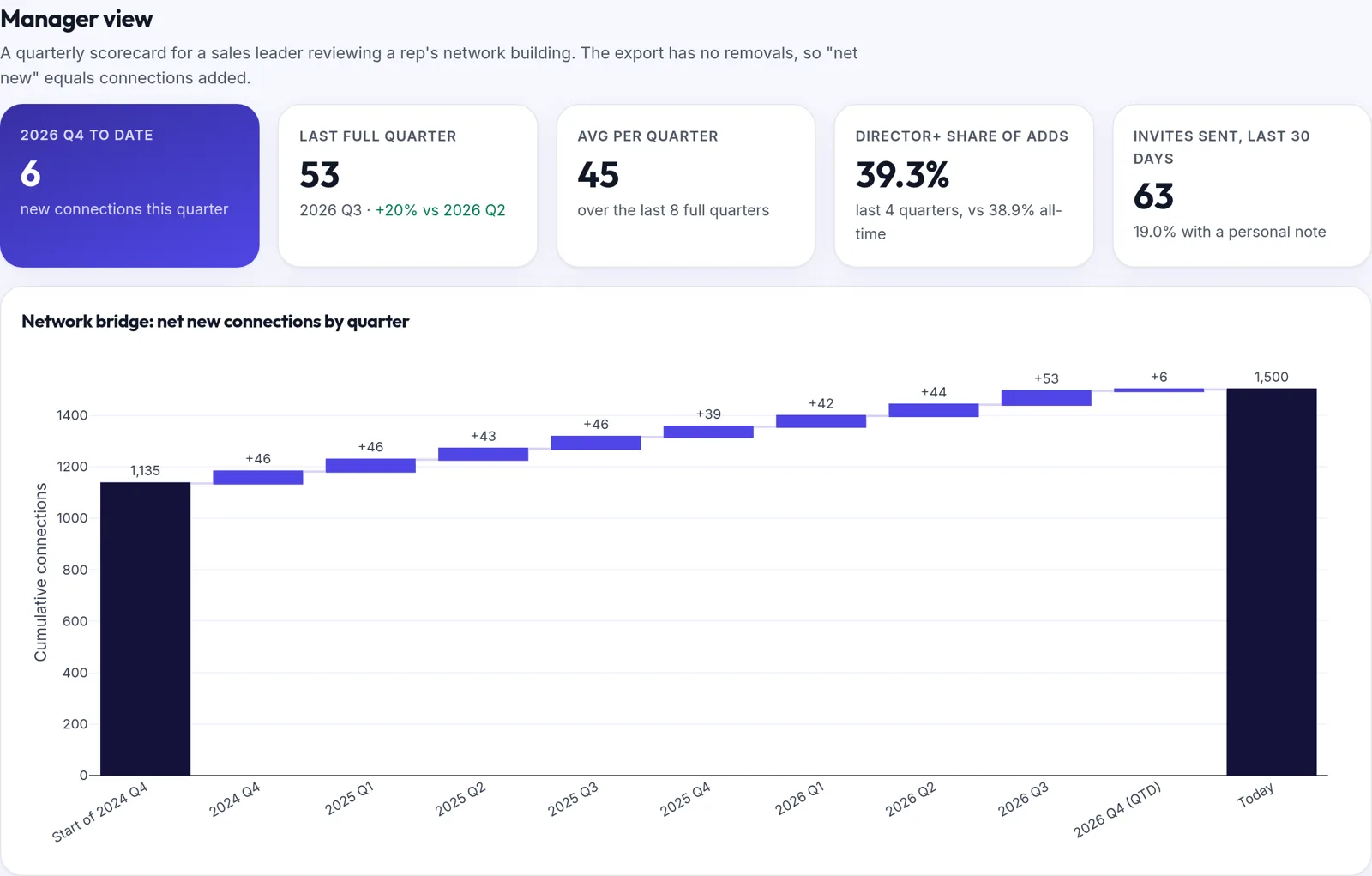
Use the manager view to review how a rep's network is growing each quarter, and whether it is moving toward the buyers you sell to.
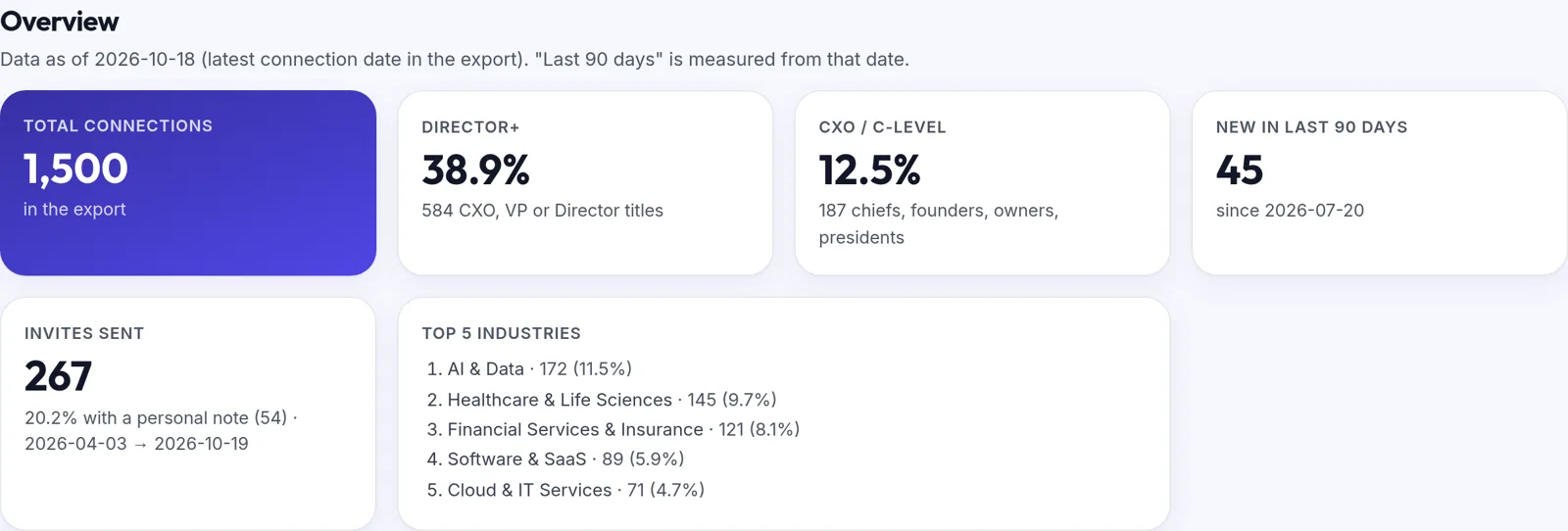
Seniority mix
Every connection's current title sorted into CXO, VP, Director, Manager, IC or Unknown, shown as a waterfall with counts and shares.
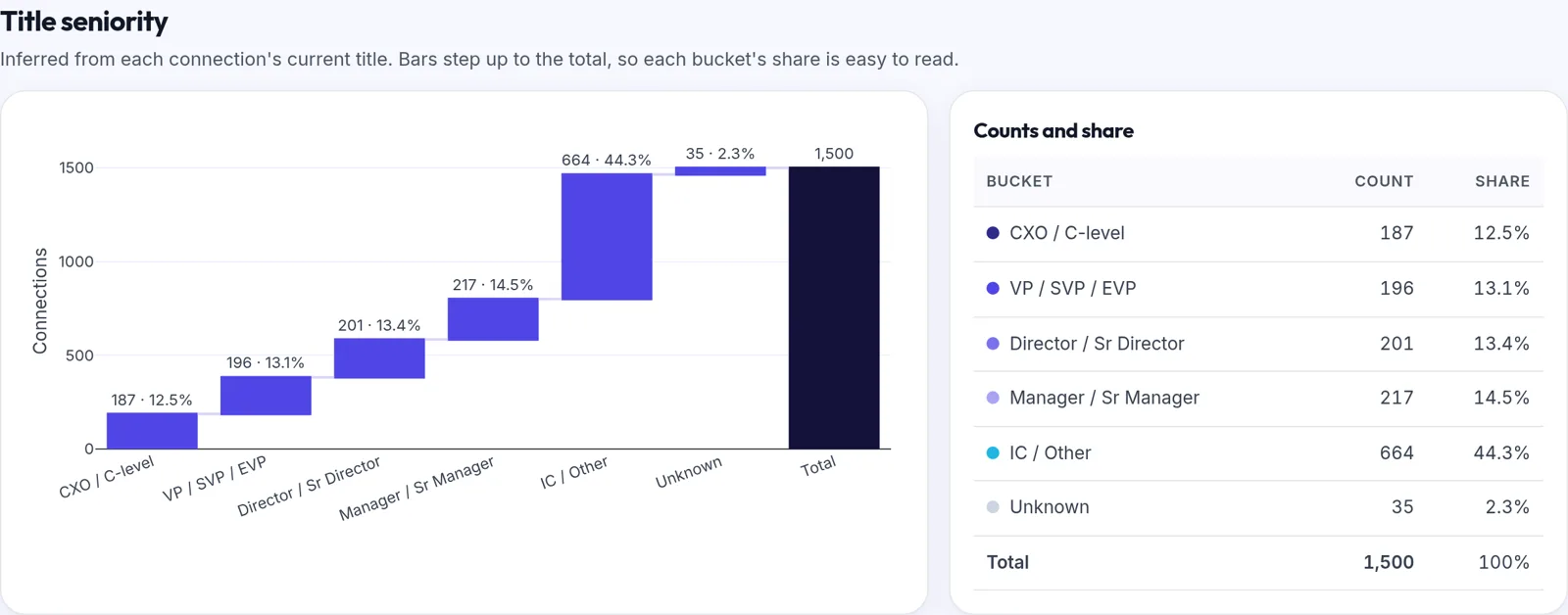
Inferred industries
LinkedIn's export has no industry field, so we infer one from company names and strong title cues. Click an industry to filter everything.
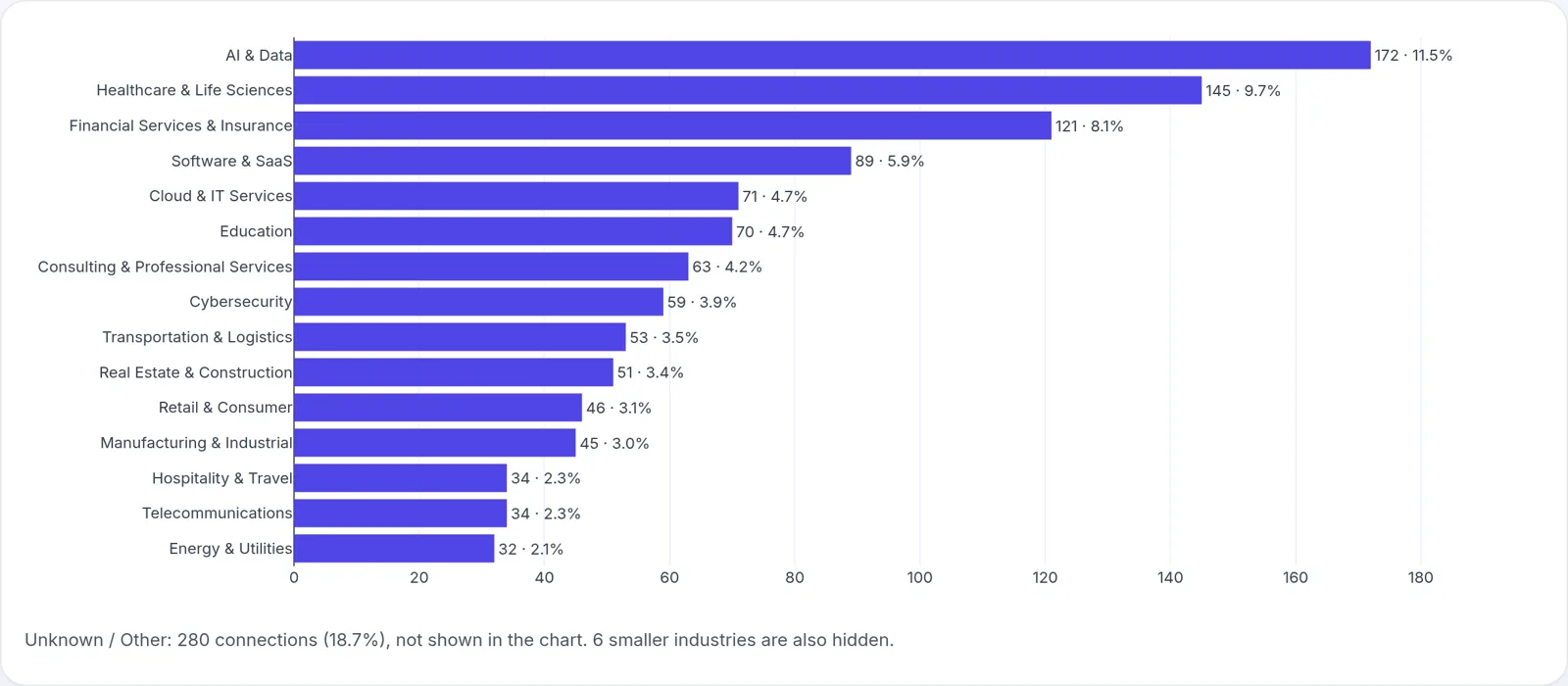
Company concentration
The companies you know the most people at, and the titles inside each one. Useful for picking accounts where you already have a way in.
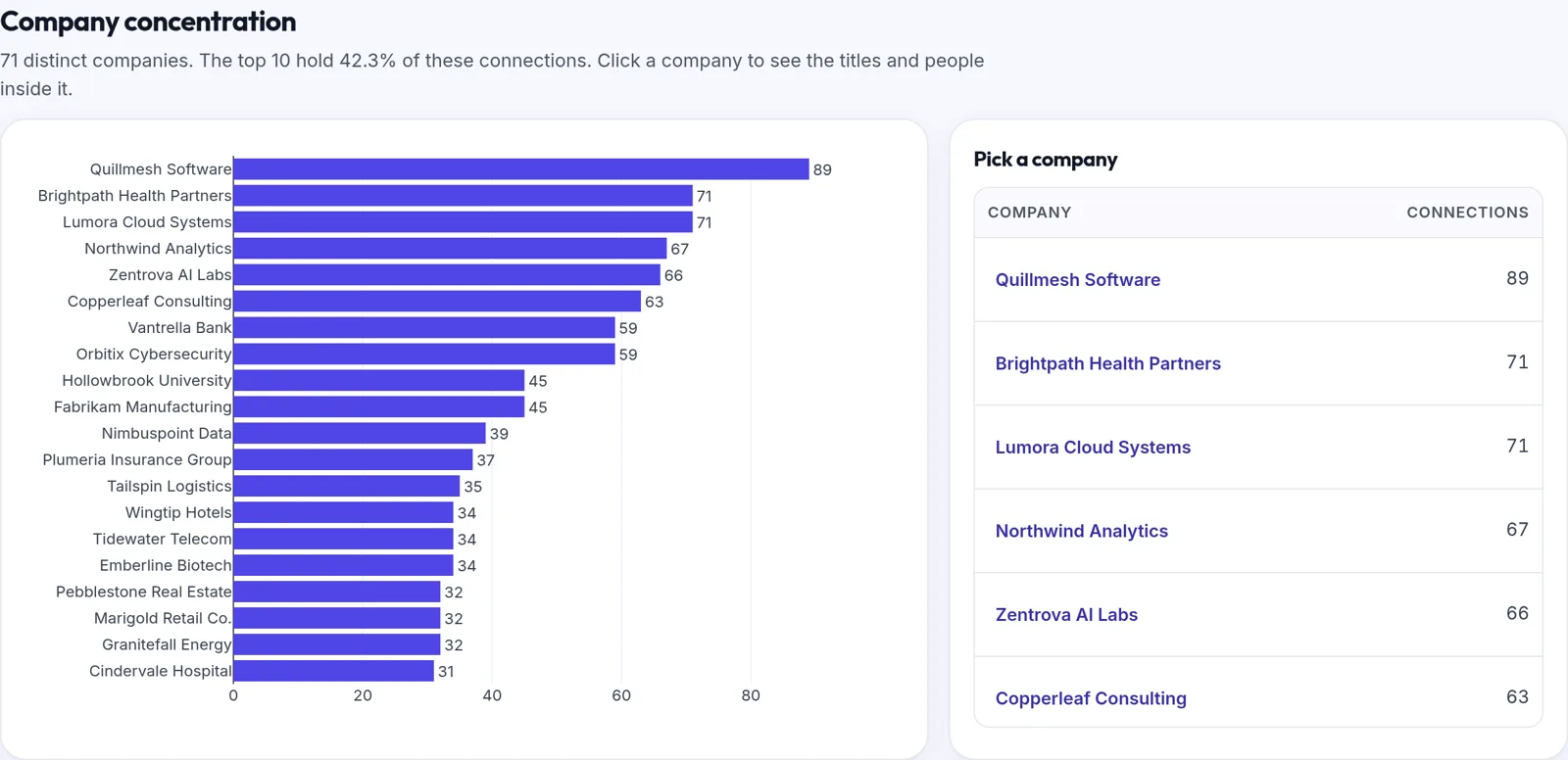
Account map and ICP tiers
Open any company and see your connections there as a power map, placed by inferred level and function, with open seats for the roles you don't know yet. Every person gets an ICP tier (seniority first, adjusted for function fit) with a short reason, and you can show only the top tier. Drawn in your browser. In a Snapshot, edits last until you leave the page; Weekly keeps them from week to week.
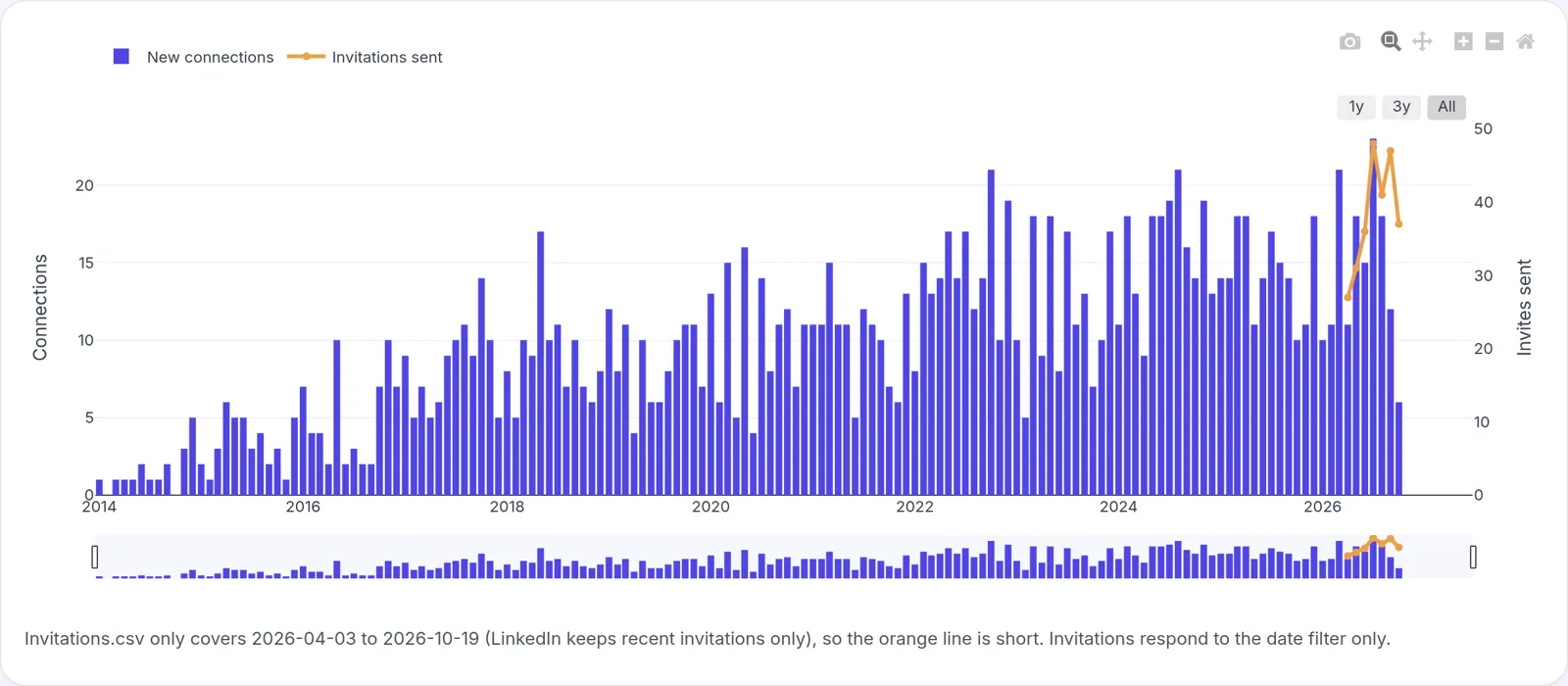
Growth timeline
Connections added per month, the share that are Director or above, and how your seniority mix has changed over time.
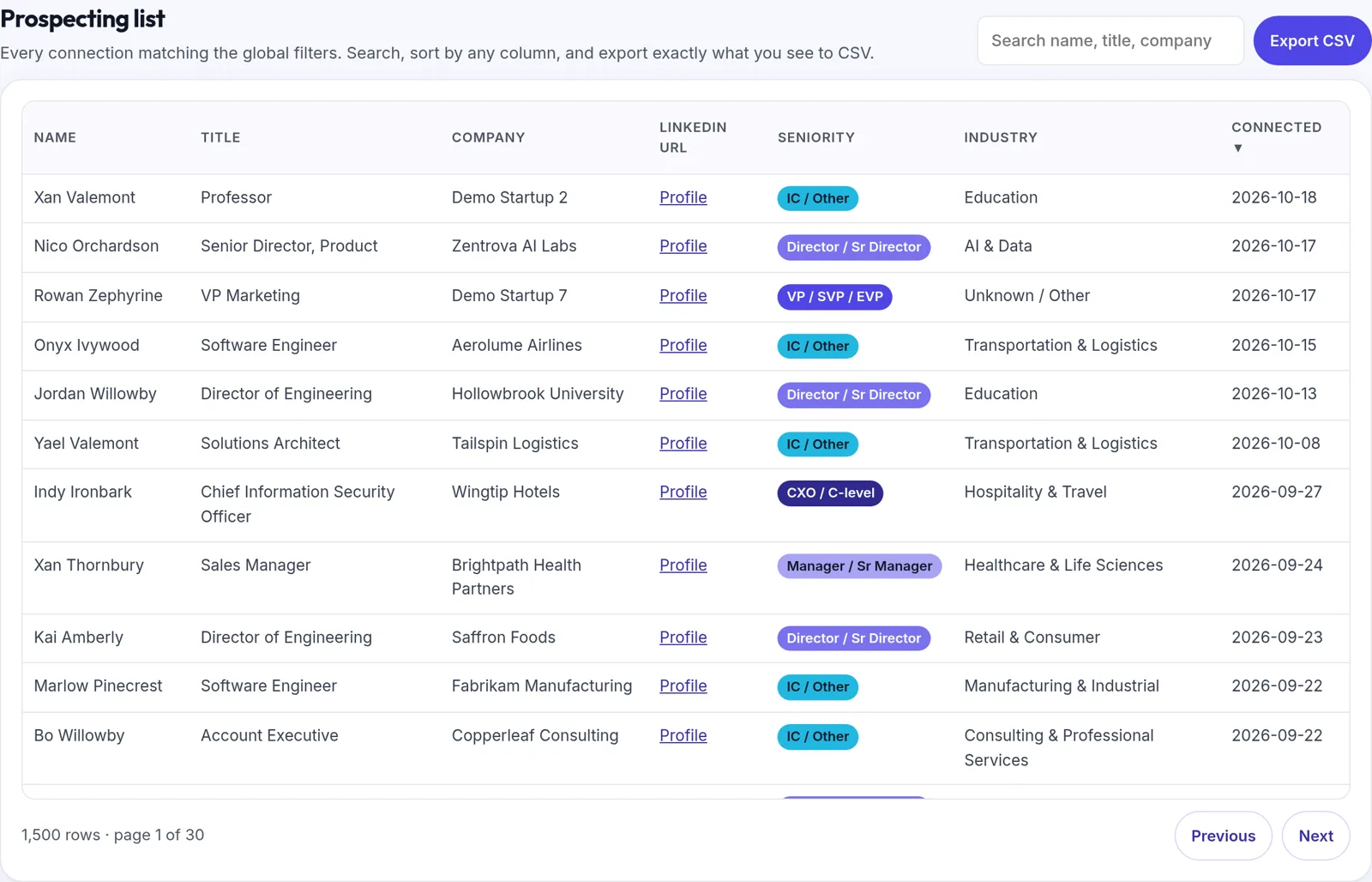
Prospecting list with CSV export
Filter by seniority, industry, company or date, then download the filtered list as a CSV for your CRM or sequencing tool.
Outreach readout and manager summary
Invitations sent and the share with a personal note, message activity by month (counts only, never message text), and a quarterly scorecard a sales leader can review with a rep.
Read in your browser. Only a small summary is kept.
The export zip is opened in your browser and never uploaded. A Snapshot keeps nothing: it is gone when you reload. Weekly keeps a minimal derived summary so next week can be compared with this one, and you can delete it all at any time.
- Snapshot: nothing is saved. The readout page loads its charts, fonts and file readers from cashewleads.com only, with no analytics or trackers. Message text, subjects and invitation notes are discarded as the files load.
- Weekly keeps: each connection's name, title, company, profile URL, connected-on date, inferred seniority and industry, last-message date and message count; invite counts and whether each had a note; your own positions, followed companies, skills and media-post dates.
- Never kept: message or invite text, subjects, email addresses or phone numbers.
- Weekly data is stored per person, compressed, in private collections. Your account admin sees weekly summaries; teammates see who you know at their top accounts. Nobody sees your full list.
How to get your LinkedIn export
- On a computer, sign in to LinkedIn and click the Me icon at the top of the page.
- Select Settings & Privacy.
- Click Data privacy on the left.
- Under How LinkedIn uses your data, click Get a copy of your data (some accounts show Download your data).
- Choose the larger data archive for the full readout, or pick specific files such as Connections and Invitations, then click Request archive.
- LinkedIn emails you a download link: usually within minutes for specific files and within 24 hours for the larger archive. The link works for 72 hours.
- Get your Snapshot, open the Network tab and drop in the .zip, or just Connections.csv. Nothing is uploaded.
LinkedIn's menus change from time to time. The official instructions are on LinkedIn Help: Download your account data and Export connections from LinkedIn. Some connections choose not to share their email address, so those emails will be missing from the export.
How we infer seniority and industry
LinkedIn's export includes each connection's current title and company but no seniority or industry, so both are inferred with transparent rules you can read.
Seniority, from the title
- CXO / C-level: Chief titles and C-suite acronyms (CEO, CFO, CRO and so on), founders, owners, presidents, managing or general partners and board chairs.
- VP / SVP / EVP: vice presidents, Head of, managing directors and general managers.
- Director / Sr Director: directors, chiefs of staff and partners.
- Manager / Sr Manager: managers and supervisors. Role-name titles such as Account Manager or Product Manager count as IC because they rarely manage people.
- IC / Other for any other title, and Unknown when the title is blank.
Industry, from the company
- A short reference list of widely known brands.
- Keywords in the company name, such as Bank, Health or Logistics.
- Strong title cues only, such as nurse, professor or attorney. Job functions like sales or security are not used, because they say little about the employer.
- Company peers: if most people at a company were assigned an industry, the rest follow.
- Anything left is shown honestly as Unknown / Other.
Data notes
- Titles and companies are as of your export, not as of when you connected.
- The export has no removals, so "net new" means connections added.
- There is no location field, so there is no map view of where people are.
- Invitations cover only the period LinkedIn keeps. Notes are reduced to yes or no.
- Messages are counted by conversation and date only. Message text is never read.
- The Network readout shows its own coverage numbers, such as how many connections have an Unknown industry, so you can judge the inferences for yourself.
What a LinkedIn export can and can't show
- LinkedIn exports only each connection's current company and title. Past employers and job changes come from your own weekly uploads, so history starts with your first upload.
- There is no 2nd-degree network in the export. We can only rank people you're already connected to; for gaps we suggest titles to search for.
- Invites show as accepted when the person appears in your connections. LinkedIn doesn't export pending or declined status.
- Seniority, function and industry are inferred from titles and company names. They're good, not perfect. Account maps and ICP tiers are built the same way, so check them and correct what is off.
- Acceptance rate is an estimate, shown as one, because the export has no accepted or declined status.
- Posting cadence counts only posts with a photo or video (Rich_Media.csv). Text-only posts and post analytics aren't in the export.
Start with a Snapshot. Track weekly when you're ready.
Try everything on demo data first. Prices in USD.
Pipeline Studio Snapshot
$49 one-time
Credited toward the subscription
- Load your own LinkedIn export, as often as you like
- The full Network readout: every chart, the prospect list with CSV export, the outreach readout and the manager summary
- Account map for any company in your readout
- Read only in your browser; tied to your Cashewleads sign-in
Pipeline Studio Weekly
$20 per user / month
Monthly, cancel any time
- Everything in the Snapshot, for every seat
- Weekly uploads, growth dashboard, streaks and badges, what's new, job changes, warmth, invites, Next 10
- Account maps for every company, ranked by your connections, with ICP tiers and open buying-committee seats
- Automatic top accounts (pin your own if you like), buying-committee grid (nine profiles) and warm paths
For a team
$20 per seat / month
Pipeline Studio Weekly
- Request seats from your portal; we set them up
- Your account admin assigns seats to reps
- Manager view with team milestones, streaks and coverage
Demo data is free and needs no sign-up. Online payment isn't open yet; you can sign in and try everything on demo data now.
Turn who you know into meetings
Pipeline Studio shows where your team already has a way in. Cashewleads books qualified meetings with the buyers you still need.